Short answer: Shopify's Live View tells you how many people are on your store and roughly where they are. It doesn't tell you what each of them is doing.
To see each shopper's cart, the products in it, their location, device and where they came from, use a live cart app. CartSpy shows this shopper by shopper, as it happens. It is not a session recorder: you see what people did, not a video of their screen.
Shopify's Live View counts visitors right now: people who viewed a page or clicked something in the past five minutes. The map or globe puts a dot where each recent visit came from, and you can hover a dot for a little more about that visit or order. Next to it are the day's sessions, orders, sales, top locations and top products, and ten-minute counts of active carts, checkouts and purchases.
That is the pulse of the store. What it doesn't give you, per visitor, is:
"Who is on my store" can mean three things, and they need different tools.
| You want to… | Kind of tool | Examples |
|---|---|---|
| Know how busy the store is | Visitor counter | Shopify Live View (built in) |
| See each shopper's cart, products and source | Live cart app | CartSpy and similar apps (see the comparison) |
| Watch how someone scrolled and clicked | Session recorder | Microsoft Clarity, Lucky Orange |
Many stores use a recorder and a cart app together: one for how the page behaves, the other for what shoppers buy and leave.
CartSpy is an app for Shopify that receives your storefront's events through Shopify's web pixel. Its Live View gives each shopper who adds to cart, checks out or orders a card, newest first:
Between those cards the feed counts the people who visited without adding anything ("2 people visited your store"), and the metrics above it show visitors right now. Open any card to see that shopper's path: the pages they viewed and everything they added and removed.
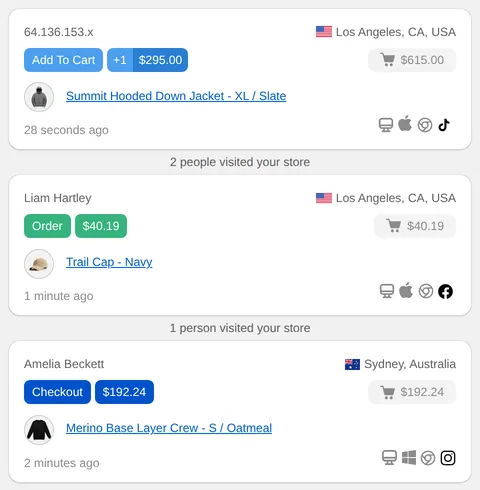
What happens after the visit is kept too: carts that don't become orders go to the abandoned carts list, and the sources are added up in carts and orders by traffic source. The listing: CartSpy on the Shopify App Store (apps.shopify.com/cartspy).
Shopify's Live View shows how many visitors were active in the last five minutes and dots on a map. For detail per shopper, use an app: CartSpy shows each shopper who adds to cart, checks out or orders, with their products, city, device, browser and traffic source.
No. CartSpy is not a session recorder. It records storefront events such as page views, adds to cart, checkouts and orders, and shows them per shopper and per cart. For replays and heatmaps use a tool such as Microsoft Clarity or Lucky Orange.
Only when Shopify knows it, for example a logged-in customer or a shopper who has entered details at checkout. Everyone else is shown as anonymous, with a location and device.
Yes, as counts. The Live View shows how many people visited between cart events, and the metrics show visitors right now. Individual cards are for shoppers who add to cart, check out or order.
Essential is $7.99 a month and Advanced is $14.99 a month, each with a 7-day free trial.
Install, and each cart appears with its shopper as it happens. 7-day free trial, cancel any time.
Start free trial