Short answer: you can't, in the Shopify admin alone. Shopify's abandoned checkouts only begin once a shopper reaches checkout and types in an email or phone number. Carts that are left before that are never listed.
To see them, you need an app that records every add to cart as it happens. CartSpy is one: it keeps each abandoned cart with the products still in it, the step the shopper reached, and where they came from.
Shopify gives you three views of cart activity. Each is useful. None of them is a list of the carts that were filled and then left before checkout.
An abandoned checkout is a checkout the shopper started, entered an email in, and did not pay for. Shopify counts one as abandoned once it has sat unfinished for more than ten minutes after the email was given, and deletes them from the admin after three months. This list powers Shopify's recovery emails, which is why it needs the email: without contact details there is nobody to send to.
Live View has a Customer behavior card with three counts for the last ten minutes: active carts, checking out and purchased. They are numbers only. You see that four sessions have a cart, not which products are in them or who the shoppers are, and the numbers roll off after ten minutes.
Shopify's reports count sessions that added to cart, reached checkout and completed an order. That tells you how many carts stall. It does not show the carts themselves.
So the part of the funnel between "added to cart" and "entered an email at checkout" is where Shopify keeps totals but no carts. On most stores many more carts are started than checkouts, so this is usually the larger group of lost sales, and the one you know least about.
Three approaches work. They answer different questions.
If the question is what was in those carts and why did they stop, you need the first. The other two are for reaching the shopper and for measuring the rate.
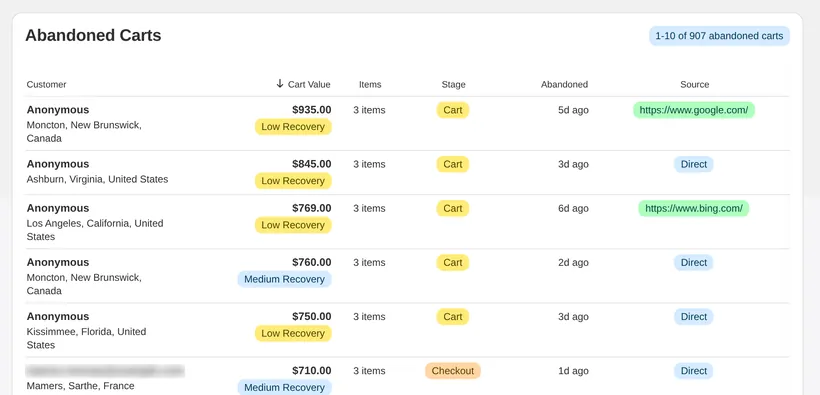
CartSpy is an app for Shopify that records every add to cart, checkout and order from your storefront. When a cart does not become an order, it stays in the Abandoned Carts list with its value, its items, the stage the shopper reached (cart, checkout or payment), when they left, their location and the traffic source that brought them.
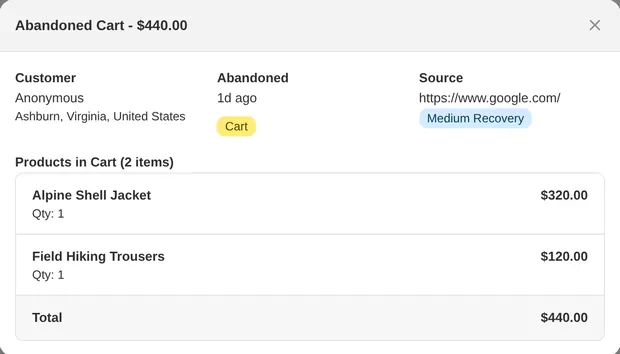
What it does not do, honestly: it does not invent contact details. Most carts left before checkout are anonymous, and CartSpy shows them as anonymous. Where a shopper did leave an email or phone number, the Advanced plan's retargeting export lists it with the products, ready for Klaviyo, Mailchimp or a Meta audience. CartSpy does not send recovery emails itself.
More on the reports: abandoned cart analytics. To watch carts form before they are abandoned: seeing add to carts live. The listing: CartSpy on the Shopify App Store (apps.shopify.com/cartspy).
Shopify creates an abandoned checkout only after a shopper starts checkout and enters an email or phone number. A cart that never reaches that point has no checkout record, so it does not appear in Orders > Abandoned checkouts.
Not in the Shopify admin. Shopify's reports count sessions that added to cart, but do not list those carts or their products. An app that records add-to-cart events, such as CartSpy, keeps each cart with its products, value, location, device and traffic source.
Only if you have their contact details, and a shopper who never reached checkout usually has not given any. Most carts left before checkout are anonymous. CartSpy shows who is known and exports contacts where a shopper left them; it does not send recovery emails itself.
Yes. Every abandoned cart is marked with the stage it reached: cart, checkout or payment. The daily email also says how many of yesterday's abandoned carts reached checkout and how many were left before it.
Essential is $7.99 a month and includes abandoned cart analytics. Advanced is $14.99 a month and adds longer history and all CSV exports, including the retargeting list. Both have a 7-day free trial.
Install, and every abandoned cart is kept with its products from the first add to cart. 7-day free trial, cancel any time.
Start free trial